
Riven Cloud
  • 0 Shopping Cart
  • Home
  • Store
    • Browse All
    • Cloud Server
    • cPanel Hosting
    • SSL Certificates
    • Domain Whois Lookup
    • Register a New Domain
    • Transfer Domains to Us
  • Announcements
  • Knowledgebase
  • Affiliates
  • Contact Us
  • More
  • Account
    • Login
    • Forgot Password?
  1. Portal Home
  2. Knowledgebase
  3. VirtFusion
  4. VirtFusion Basics
  5. How to Check the Online or Offline Status of a VPS in VirtFusion

  Support

My Support Tickets
Announcements
Knowledgebase
Downloads
Network Status
Open Ticket

How to Check the Online or Offline Status of a VPS in VirtFusion Print

  • 0

You can quickly check whether your VirtFusion VPS is running or stopped by viewing its status in the client area or the VirtFusion Control Panel.


1. Log in to your VirtFusion Control Panel.


2. From the dashboard, locate your server in the server list and click Manage.
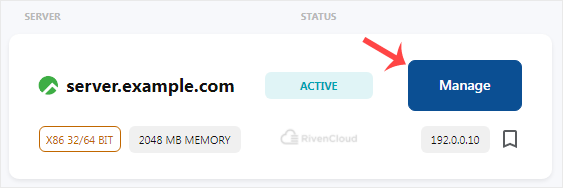
vf-vps-status.gif


3. The top-right corner shows your VPS status. Running means it is online.
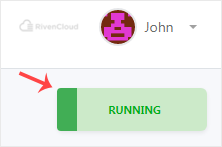
vf-running-status.gif


Now you know how to check your VPS status in VirtFusion.


Was this answer helpful?

Related Articles

How to Check VPS Specifications in VirtFusion You can view your VPS specifications in VirtFusion through the client area or the VirtFusion... How to Enable Two-Factor Authentication in VirtFusion Two-factor authentication helps secure your account and prevent unauthorized access by adding an... How to Disable Two-Factor Authentication in VirtFusion Please follow the instructions below to disable two-factor authentication on your VirtFusion... How to Change Your VirtFusion Account Password Changing your VirtFusion account password is a simple way to keep your account secure. If you can... How to Log in to VirtFusion Control Panel You can find your Control Panel URL, email address, and password in your welcome email....
« Back

  Support

My Support Tickets
Announcements
Knowledgebase
Downloads
Network Status
Open Ticket
  • Contact Us
  • Terms of Service

Copyright © 2026 Riven Cloud. All Rights Reserved.


Loading...
Loading...
Choose language
العربية
Azerbaijani
Català
中文
Hrvatski
Čeština
Dansk
Nederlands
English
Estonian
Persian
Français
Deutsch
עברית
Magyar
Italiano
Macedonian
Norwegian
Português
Português
Română
Русский
Español
Svenska
Türkçe
Українська

Generate Password

Please enter a number between 8 and 64 for the password length