
Riven Cloud
  • 0 Shopping Cart
  • Home
  • Store
    • Browse All
    • Cloud Server
    • cPanel Hosting
    • SSL Certificates
    • Domain Whois Lookup
    • Register a New Domain
    • Transfer Domains to Us
  • Announcements
  • Knowledgebase
  • Affiliates
  • Contact Us
  • More
  • Account
    • Login
    • Forgot Password?
  1. Portal Home
  2. Knowledgebase
  3. Email
  4. Outlook 2021
  5. How to Delete Email Messages in Outlook 2021

  Support

My Support Tickets
Announcements
Knowledgebase
Downloads
Network Status
Open Ticket

How to Delete Email Messages in Outlook 2021 Print

  • 0

You can easily remove email in Outlook 2021.


If you use the POP email protocol, the email will only be removed from Outlook 2021 and remain on the mail server. With IMAP, email is deleted on both Outlook 2021 and the mail server.


1. Open Outlook 2021.

outlook-2021-icon.gif


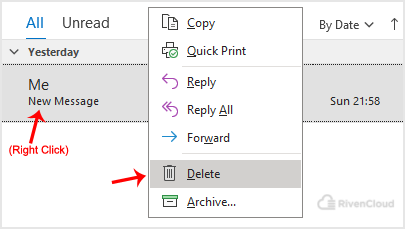
2. Go to Inbox, right-click on the message you want to remove and click on Delete.
outlook-2021-delete-message.gif


Hope you found this article useful.


Was this answer helpful?

Related Articles

How to Send Email Using Outlook 2021 You can send emails using Outlook 2021. It is pretty straightforward because you do not need to... How to Reply to an Email in Outlook 2021   You can reply to emails using Outlook 2021 instead of cPanel Webmail.   1. Open Outlook... How to Forward Email in Outlook 2021 You can forward the email using Outlook 2021.   1. Open Outlook 2021.   2. Go to Inbox,... How to Check for New Email in Outlook 2021 In this tutorial, we will show you how to check for new email messages in Outlook 2021.   1.... How to Set Up a cPanel Email Account With Outlook 2021   You can set up a cPanel email account with Microsoft Outlook 2021 and manage your email...
« Back

  Support

My Support Tickets
Announcements
Knowledgebase
Downloads
Network Status
Open Ticket
  • Contact Us
  • Terms of Service

Copyright © 2026 Riven Cloud. All Rights Reserved.


Loading...
Loading...
Choose language
العربية
Azerbaijani
Català
中文
Hrvatski
Čeština
Dansk
Nederlands
English
Estonian
Persian
Français
Deutsch
עברית
Magyar
Italiano
Macedonian
Norwegian
Português
Português
Română
Русский
Español
Svenska
Türkçe
Українська

Generate Password

Please enter a number between 8 and 64 for the password length