
Riven Cloud
  • 0 Shopping Cart
  • Home
  • Store
    • Browse All
    • Cloud Server
    • cPanel Hosting
    • SSL Certificates
    • Domain Whois Lookup
    • Register a New Domain
    • Transfer Domains to Us
  • Announcements
  • Knowledgebase
  • Affiliates
  • Contact Us
  • More
  • Account
    • Login
    • Forgot Password?
  1. Portal Home
  2. Knowledgebase
  3. WHM
  4. WHM (For Resellers)
  5. How to Delete a Package in WHM

  Support

My Support Tickets
Announcements
Knowledgebase
Downloads
Network Status
Open Ticket

How to Delete a Package in WHM Print

  • 0

You can remove the hosting package of your account, or, should you have root access, you can also remove the packages of other users from WHM.


1. Log in to your WHM Account.


2. Go to Packages >> Delete a Package or type Delete a Package in the menu filter box. The option will appear. Click on it.
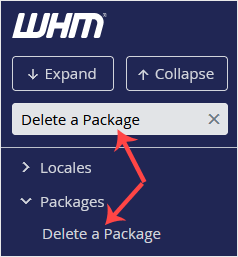
whm-reseller-delete-package-sidebar.gif


3. Under Delete a Package, select a package you want to remove and click on Delete.
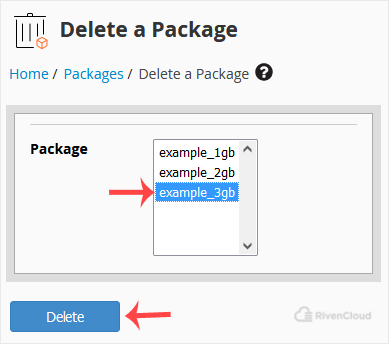
whm-reseller-choose-delete-pack.gif


Congratulations, you have successfully removed the selected package.


Was this answer helpful?

Related Articles

How to Set Custom/Private Nameservers in WHM You can set up custom/private nameservers from WHM. 1. Log in to WHM Account. 2. Go to Server... How to Edit a Hosting Package in WHM You can edit the hosting package of your account. With root access, you can edit the packages of... How to Create a Feature List in WHM You can create a feature list from your WHM Account. Feature lists allow you to provide a... How to Remove a Feature List from WHM Follow this tutorial if you have a feature list you don't need and want it removed. 1. Log in to... How to Force cPanel Users to Change Their Passwords Using WHM Do you want to force cPanel users to change their passwords after login? If so, follow this...
« Back

  Support

My Support Tickets
Announcements
Knowledgebase
Downloads
Network Status
Open Ticket
  • Contact Us
  • Terms of Service

Copyright © 2026 Riven Cloud. All Rights Reserved.


Loading...
Loading...
Choose language
العربية
Azerbaijani
Català
中文
Hrvatski
Čeština
Dansk
Nederlands
English
Estonian
Persian
Français
Deutsch
עברית
Magyar
Italiano
Macedonian
Norwegian
Português
Português
Română
Русский
Español
Svenska
Türkçe
Українська

Generate Password

Please enter a number between 8 and 64 for the password length