
Riven Cloud
  • 0 Shopping Cart
  • Home
  • Store
    • Browse All
    • Cloud Server
    • cPanel Hosting
    • SSL Certificates
    • Domain Whois Lookup
    • Register a New Domain
    • Transfer Domains to Us
  • Announcements
  • Knowledgebase
  • Affiliates
  • Contact Us
  • More
  • Account
    • Login
    • Forgot Password?
  1. Portal Home
  2. Knowledgebase
  3. Databases
  4. How to Optimize a Database via phpMyAdmin in cPanel

  Support

My Support Tickets
Announcements
Knowledgebase
Downloads
Network Status
Open Ticket

How to Optimize a Database via phpMyAdmin in cPanel Print

  • 0

Optimizing your database in cPanel using phpMyAdmin boosts performance by freeing up unused space.


1. Log in to your cPanel account.

2. In the Databases section, click on phpMyAdmin.


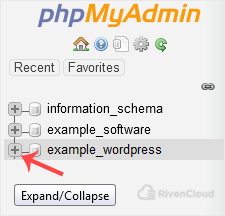
3. Click on the Expand icon from the navigation tree in the left sidebar.

4. Scroll down and mark Check All. Click on the drop-down option and select Optimize tables.
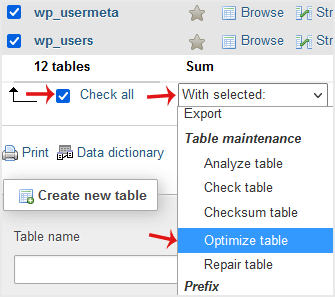

The table has been successfully optimized.


Was this answer helpful?

Related Articles

How to Delete a Database Table via phpMyAdmin in cPanel Deleting a database table in cPanel using phpMyAdmin is easy but important. Be careful to avoid... How to Create a Database in cPanel Creating a database in cPanel is quick and straightforward. Follow these steps to set up your... How to Rename a Database in cPanel Creating a database in cPanel is quick and straightforward. Follow these steps to set up your... How to Delete a Database in cPanel You can delete a database in cPanel. Make sure to take a backup before deleting it because once... How to Create a Database Username in cPanel A database username is important for connecting your website or application to the database. You...
« Back

  Support

My Support Tickets
Announcements
Knowledgebase
Downloads
Network Status
Open Ticket
  • Contact Us
  • Terms of Service

Copyright © 2026 Riven Cloud. All Rights Reserved.


Loading...
Loading...
Choose language
العربية
Azerbaijani
Català
中文
Hrvatski
Čeština
Dansk
Nederlands
English
Estonian
Persian
Français
Deutsch
עברית
Magyar
Italiano
Macedonian
Norwegian
Português
Português
Română
Русский
Español
Svenska
Türkçe
Українська

Generate Password

Please enter a number between 8 and 64 for the password length